What This Page Gives You, Stated Plainly
There is no form on this page that spits out a robots.txt file, and you do not need one. A robots.txt file is a short plain-text file with a small, stable grammar; every generator tool on the internet outputs the same handful of patterns. What actually goes wrong with robots.txt is never the syntax. It is blocking a crawler you needed, shipping a staging rule to production, or believing the file does something it does not. So this page gives you the three things a generator cannot: the documented behavior of each crawler token, least-privilege patterns to copy and adapt, and a way to verify the deployed file. That last part is live and free: AEO Goal’s AI visibility scan fetches your real robots.txt and reports which of 16 AI crawler user agents it currently allows or blocks, with no signup.
How Robots.txt Actually Works
The file lives at the root of the host: https://yourdomain.com/robots.txt. It applies to that host only. A subdomain like docs.yourdomain.com needs its own file, and http and https are technically separate hosts too. There is no such thing as a robots.txt for a subfolder.
Rules are grouped by User-agent. A crawler finds the group that best matches its own token and obeys only that group; if no group matches, it falls back to User-agent: *. This is the detail that bites teams configuring AI access: the moment you create a User-agent: GPTBot group, GPTBot ignores your * group entirely, including its Disallow lines, unless you repeat them.
Within a group, Disallow and Allow lines name path prefixes. When rules conflict, the most specific rule, meaning the longest matching path, wins. Major engines also support * as a wildcard and $ to anchor the end of a URL. A Sitemap: line can appear anywhere in the file and applies globally; it is how you point every crawler at your XML sitemap without waiting for discovery.
Two properties matter more than any syntax detail. First, robots.txt is advisory. Compliance is voluntary; the mainstream crawlers listed below document that they obey it, but the file is a request, not access control. Anything genuinely private belongs behind authentication, not behind a Disallow line. Second, robots.txt controls crawling, not indexing. Google documents that a URL blocked in robots.txt can still be indexed from links alone, without its content. The practical consequence is counterintuitive enough to repeat: to remove an indexed page, you must let crawlers fetch it so they can read the noindex directive. Blocking the URL preserves the stale listing.
The AI Crawler Tokens And What Each One Actually Does
Every token below is published by its vendor. This table says what each vendor documents, nothing more.
| Token | Operator | Documented purpose |
|---|---|---|
GPTBot |
OpenAI | Crawls content that may be used to train OpenAI models. Disallowing it opts your site out of that training use. |
OAI-SearchBot |
OpenAI | Crawls to surface and link to sites in ChatGPT’s search features. OpenAI documents it is not used to train models. Blocking it removes you from ChatGPT search results. |
ChatGPT-User |
OpenAI | Fetches a page live when a ChatGPT user’s request requires it. Not a bulk crawler; each fetch is user-initiated. |
ClaudeBot |
Anthropic | Anthropic’s web crawler for collecting content that may improve its models. Anthropic separately documents Claude-User for user-initiated fetches and Claude-SearchBot for search-related indexing. |
PerplexityBot |
Perplexity | Indexes pages for Perplexity’s search and answers. Blocking it removes you from Perplexity’s index. Perplexity also documents Perplexity-User for fetches made on a user’s behalf. |
Google-Extended |
Not a crawler. A control token, read by Googlebot, governing whether your content is used for Gemini model training and grounding. Disallowing it does not affect Google Search crawling, indexing, or ranking. | |
Bingbot |
Microsoft | Bing’s search crawler. The Bing index also underlies Microsoft Copilot’s web results, so blocking Bingbot has consequences beyond the classic blue links. |
CCBot |
Common Crawl | Builds the Common Crawl corpus, an open dataset widely used in model training. Disallowing it opts out of that corpus going forward. |
The pattern worth internalizing: these tokens sort into lanes, and each lane has a different cost when blocked.
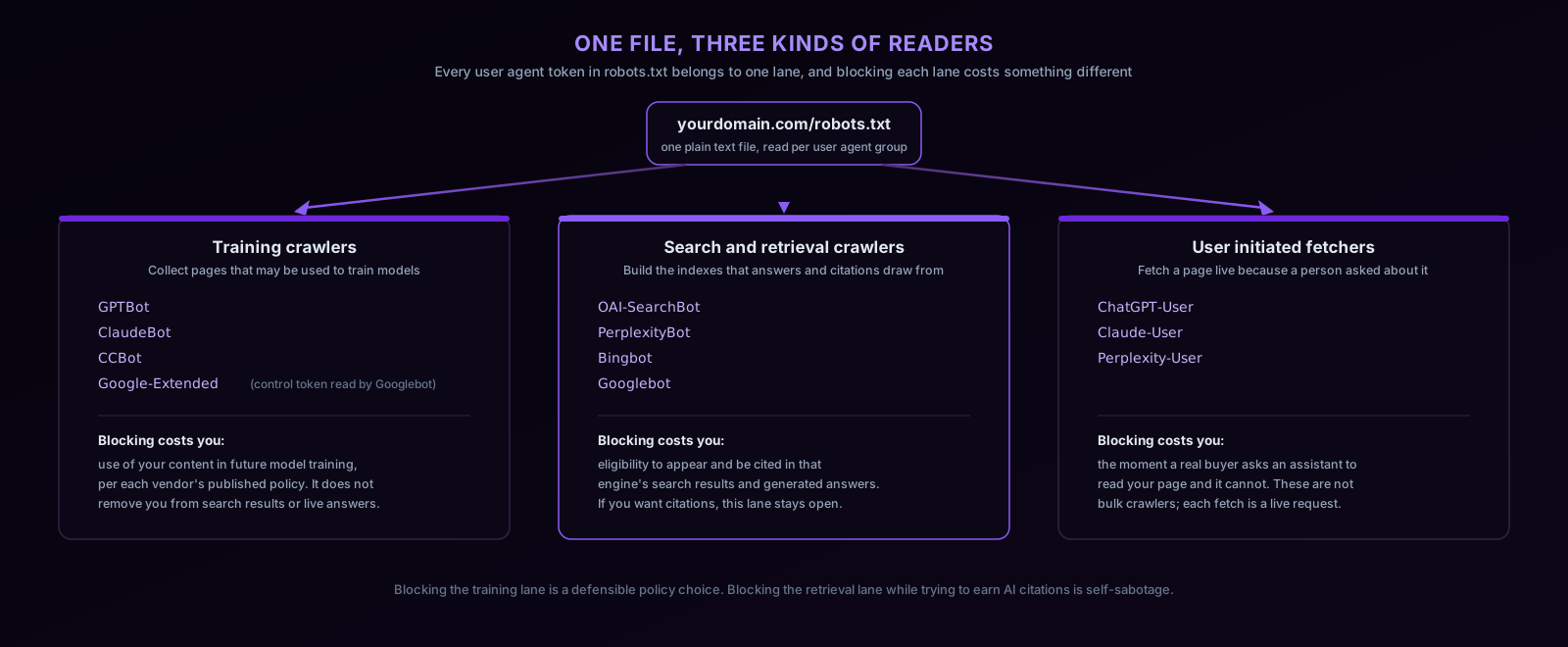
Blocking the training lane is a legitimate policy decision about how your content is reused, and it does not hurt your visibility in answers. Blocking the retrieval lane while trying to earn AI citations is self-sabotage: an engine cannot cite a corpus it was told not to build. Blocking the user-initiated lane means that at the exact moment a buyer asks an assistant to read your page, the assistant cannot.
Least-Privilege Patterns To Copy
The principle is the same as in access control: allow what serves your goals, deny what does not, and be explicit about both. Public marketing and documentation pages should be readable by every retrieval crawler; application, API, and admin surfaces should be readable by none.
Pattern 1: open for visibility, private paths protected. This is the shape AEO Goal’s own production robots.txt uses, with explicit AI crawler groups so the policy is visible and deliberate:
User-agent: GPTBot
User-agent: OAI-SearchBot
User-agent: ChatGPT-User
User-agent: ClaudeBot
User-agent: PerplexityBot
User-agent: Bingbot
Allow: /
Disallow: /app
Disallow: /api
Disallow: /admin

User-agent: *
Allow: /
Disallow: /app
Disallow: /api
Disallow: /admin

Sitemap: https://yourdomain.com/sitemap.xml
Note that the private paths are repeated in both groups. That is the named-group rule from earlier: a crawler matching the AI group never reads the * group, so any Disallow that should bind everyone must appear in every group.
Pattern 2: opt out of training, stay retrievable. For teams whose policy is “do not train on our content, but keep us in the answers”:
User-agent: GPTBot
User-agent: ClaudeBot
User-agent: CCBot
User-agent: Google-Extended
Disallow: /

User-agent: *
Allow: /
Disallow: /app
Disallow: /api
Disallow: /admin

Sitemap: https://yourdomain.com/sitemap.xml
OAI-SearchBot, PerplexityBot, Bingbot, and Googlebot fall through to the * group and keep crawling public pages, so search and answer visibility is preserved while the documented training crawlers are refused.
Pattern 3: full AI opt-out. Add the retrieval tokens to the disallow group in pattern 2. This is a coherent position for some businesses, but name its cost honestly before shipping it: your pages become ineligible for the generated answers where a growing share of buyer research happens, and your AI visibility goes to zero by your own hand. Make it a documented decision, not a default someone copied from a blog post.
Common Mistakes
- Treating robots.txt as security. The file is public and compliance is voluntary.
/adminshould be behind auth whether or not it is also disallowed; the Disallow line just keeps well-behaved crawlers from wasting budget on redirects to your login page. - Blocking a page you want deindexed. Covered above, but it is the single most common robots.txt error: Disallow prevents the crawler from ever seeing your noindex.
- Letting a staging rule reach production.
Disallow: /on a staging host is correct; the same two lines deployed to production is a visibility outage. Environment-specific robots files should be generated at build or serve time, not hand-edited. - Forgetting the named-group override. Adding
User-agent: GPTBot / Allow: /to welcome an AI crawler silently exempts GPTBot from every rule in your*group. Repeat the Disallows. - Blocking assets. Disallowing CSS and JavaScript directories prevents crawlers that render pages from seeing the page as users do. Block private application routes, not asset folders.
- Assuming one file covers all subdomains. It does not. Audit
www, apex, docs, blog, and any regional subdomains separately. - Relying on Crawl-delay. Google ignores it entirely; support elsewhere varies. Rate limiting belongs at your CDN or server, not in robots.txt.
Verifying The File You Actually Shipped
A robots.txt file is release-sensitive: one careless line removes entire sections of a site from every crawler’s reach, and nothing visibly breaks. So verification, not generation, is the step that deserves tooling.
For Google’s view, Search Console’s robots.txt report shows the version Googlebot last fetched and flags parse problems. It tells you nothing about the AI lane. For that, run the free AI visibility scan: it live-fetches your deployed robots.txt and homepage and reports, agent by agent for 16 AI crawler user agents, which are allowed and which are blocked, alongside checks of your llms.txt, JSON-LD, canonical tags, and metadata. It is a zero-signup, single-page scan, and because robots.txt is a sitewide file, its robots findings apply to your whole domain. Run it before a robots change to baseline, and after the deploy to confirm nothing regressed.
That is also the honest boundary. The free scan verifies access from the outside, on demand. Catching the regression you did not think to check for, the firewall preset that started challenging PerplexityBot, the template that shipped with a stray noindex, is a monitoring job: inside the app, the site crawler and recurring technical audits re-check on a schedule, and AI citation tracking shows whether the engines you allowed are actually citing you, which is the number the robots file exists to serve.